



1. Services Interface Overview
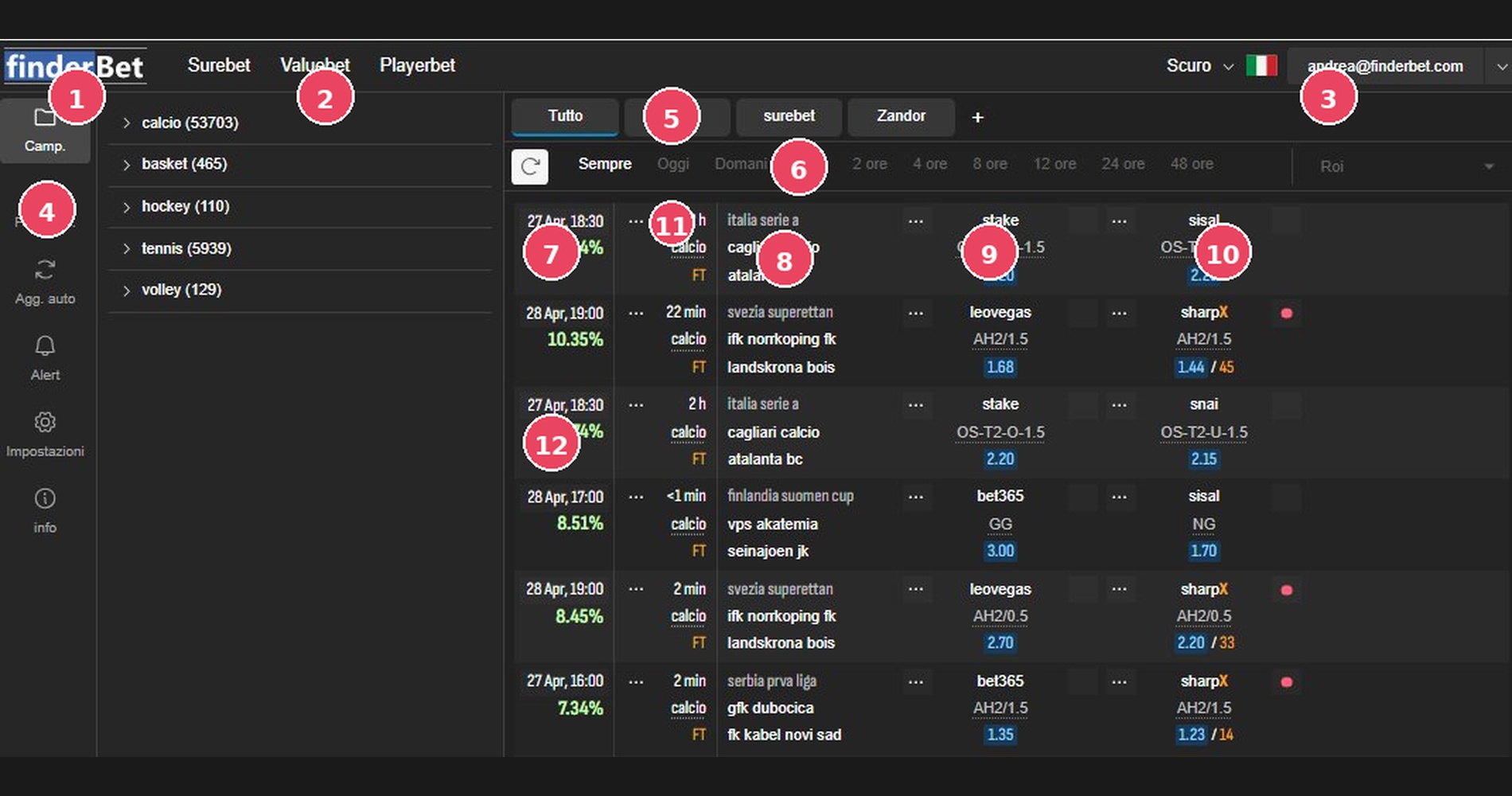
1 | Logo FinderBet | Brand logo in the top left. This serves as a quick link to the homepage. |
2 | Navigation Menu | Surebet, Valuebet and Playerbet options to switch between the various services |
3 | User Bar | Theme selector (Dark/Light), language (flag) and logged in user account. |
4 | Sidebar Sport | Sports categories with active opportunities. Includes environmental filters, auto-updates, alerts, and settings. |
5 | Profiles / Saved Filters Tab | Saved filters. The + symbol adds new profiles. |
6 | Time Filters | Period selector: Always, Today, Tomorrow, 1h, 2h, 4h, 8h, 12h, 24h, 48h. |
7 | ROI percentage | Guaranteed return in green. Clicking opens the bet distribution calculator. |
8 | Event Details | Date/time, remaining time, league, sport and teams (home and away). |
9 | Bookmaker 1 + Odds | Name of the first bookmaker and market type. Odds highlighted in blue. |
10 | Bookmaker 2 + Odds | Second bookmaker with related market and odds. The RED dot indicates a BANKING market exchange |
11 | Missing Time | Hours/minutes remaining until the meeting starts. Useful for prioritizing urgent opportunities. |
12 | Other plays | Other arbitrageable markets. |
Automatic Update and Alerts
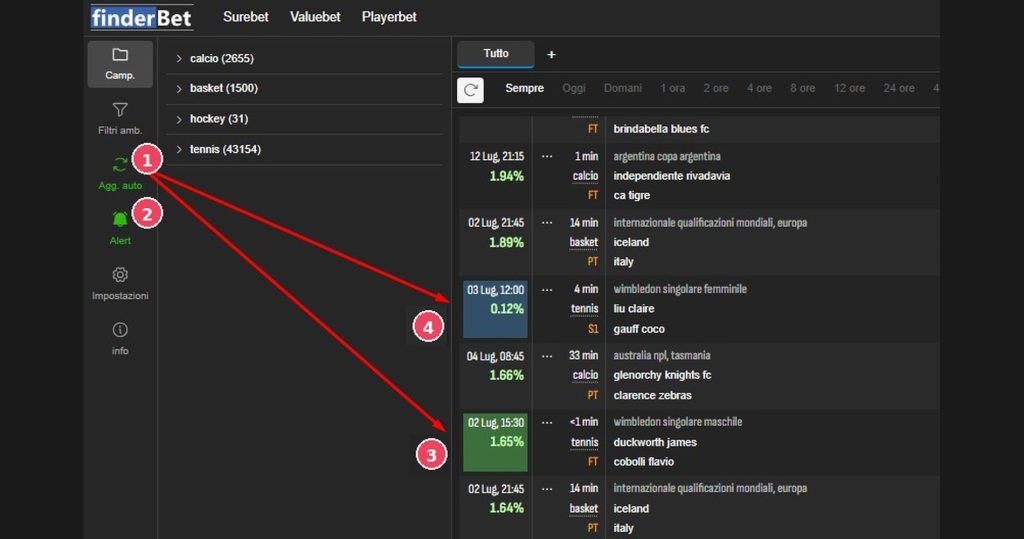
1 | Auto Update (Automatic Update) | Enable automatic refresh of the surebet list without manually reloading the page. The list updates in real time, displaying new opportunities as soon as they are detected by the system. |
2 | Alert (Sound Notification) | Plays a notification sound whenever a new play appears in the list. |
3 | Green | New bet/surebet appeared for the first time |
4 | Blu | Update of an existing bet/surebet in the list |
Reset all button
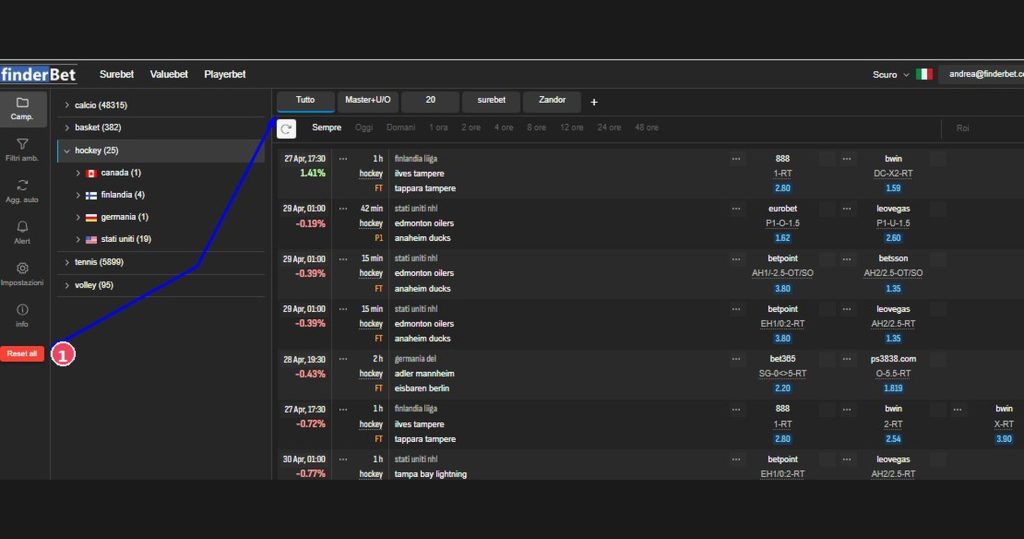
1 | Reset all | Reset all applied filters in just one click, both those set in the Environmental Filters panel (bookmaker, sport, odds, dates, profit, exchange, availability) and the saved filters selected as tabs in the main list. By clicking it the list returns to the complete view without any active filter, equivalent to selecting the “All” tab with all the Room Filters. reset. The red color disappears as soon as all filters have been removed. |
2. Calculator and Oddschecker
General View – Playlist + Side Calculator
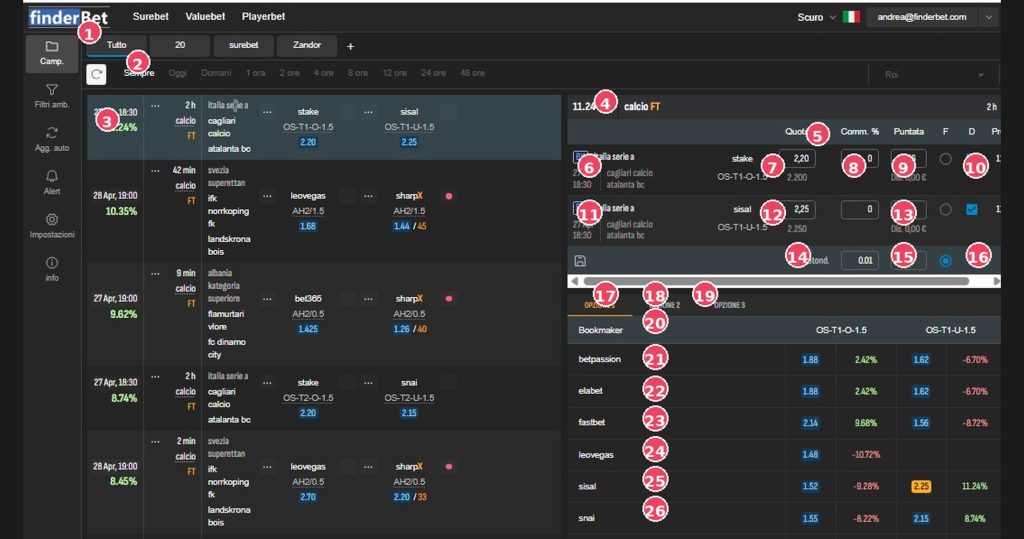
1 | Saved Filters Tab | Saved filter profiles. |
2 | Time filters | Playlist period selector. |
3 | Selected played line | Dark blue row: open surebet in the calculator panel. Clicking another row refreshes the panel. |
Calculator Panel
4 | ROI % + Sport + Game Period | Summary: Profit Percentage (11.24%), Sports, FT Status= Full Time |
5 | Column headers | Quota / Commission % / Stake / F=Fixing / D=Imbalance |
6 | Bookmaker Line 1 | First leg: BK badge (direct link Bookmakers), championship, date/time, teams and bookmakers. |
7 | BK1 share and market | Live odds (editable) and market type. Below: odds at the time of reporting. |
8 | Commission BK1 | Commission percentage. Changing the value recalculates the bets. |
9 | BK1 calculated bet | Optimal amount to bet to guarantee the indicated profit. |
10 | Checkbox F and D BK1 | F = Fixed (prioritizes the bookmaker). D = Imbalance (shifts all the profit to one odds) |
11 | Riga Bookmaker 2 | Second leg with BK badge and opposite bookmaker. |
12 | BK2 share and market | Quota and complementary market to leg 1. |
13 | BK2 calculated bet | The sum of bets BK1 + BK2 = total amount set. |
14 | Rounding Field | Rounding precision of amounts (e.g. 0.01 = to the nearest cent). |
15 | Total Amount | Total bankroll to be distributed. Changing this value recalculates all bets. |
16 | Calculate button | Recalculates distribution after changes to odds, fees, or amount. |
Oddschecker
17/18/19 | Tabs | Table 1: odds details Table 2: Player Statistics |
20 | Oddschecker column headers | Bookmaker in column, odds for each market |
21-26 | Bookmaker lines | Odds from all bookmakers. % green = profit; Red % = loss. Yellow cell = quota selected in the calculator. |
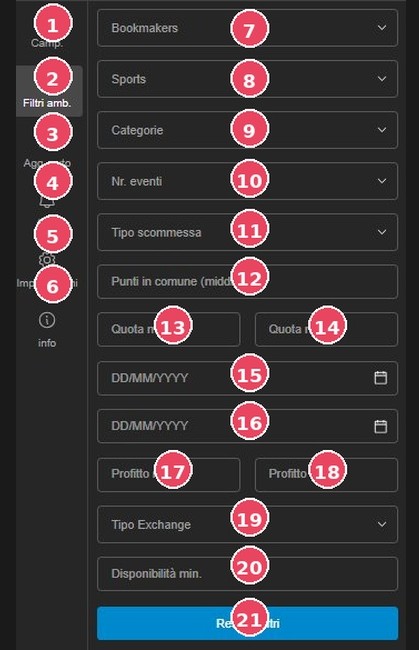
3. Environment Filters
1 | Championships | Access the available leagues/competitions view. The number of available bets is shown in brackets. |
2 | Filters | Selected item: Opens the advanced filters panel. |
3 | Automatic update | Automatic update of the play list. |
4 | Alert | Sound notification when new games appear. |
5 | Settings | Access your general account preferences. |
6 | Info | Service Manual |
7 | Bookmakers | Filter to select one or more specific bookmakers. ✓ Direct comparison between two bookmakers: Bookmakers with a valid visa are directly compared. The list only shows opportunities that involve EXCLUSIVELY the selected bookmakers. |
8 | Sports | Filter by sport: football, basketball, tennis, hockey, volleyball. |
9 | Categories | Category type of shares |
10 | No. of events | Filter by number of markets involved (2-way, 3-way). |
11 | Bet type | Type of play |
12 | Common points (middlebet) | Filter middlebets by shared range width. |
13 | Minimum odds. | Minimum threshold of the accepted odds. |
14 | Odds max. | Maximum accepted odds threshold. |
15 | Date from (start) | Event period start date (DD/MM/YYYY). |
16 | Date to (end) | End date of events period. |
17 | Min. Profit | Minimum guaranteed profit threshold. |
18 | Max profit. | Maximum guaranteed profit threshold. |
19 | Exchange Type | Select the type of exchange involved: Point/Bank. |
20 | Minimum availability. | Minimum liquidity available on the exchange. |
21 | Reset filters | Clear all filters and restore the default view. |
4. Exchange and Dutcher Availability
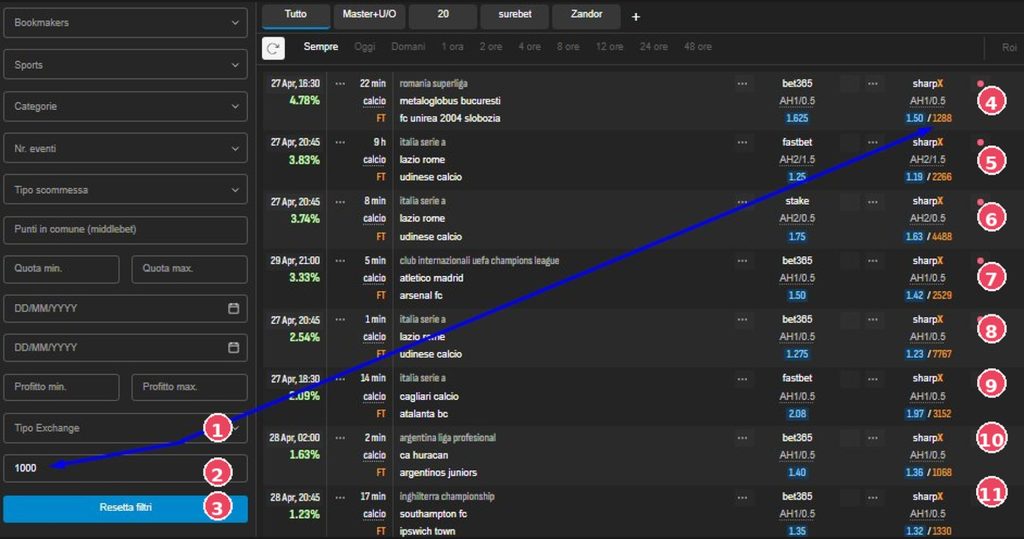
FinderBet introduces two exclusive features for Exchanges that represent a qualitative leap compared to any other arbitrage tool:
1. Minimum Exchange Availability You can set a minimum liquidity threshold on the exchange market. This automatically excludes any opportunities with insufficient volume to cover the desired stake. In the example, a minimum available amount of 1,000 units is set: the list will only show plays with at least 1,000 units available on the exchange. |
2. Dutcher – 3 Market Depths for each Exchange The Dutcher allows you to view the market depths (liquidity levels per share) for three different market depths, allowing you to cover the indicated availability. This means you can see the entire structure of the book: how many units are available at different price levels, allowing you to assess whether liquidity is real and deep enough to cover the entire stake. The number after the slash (e.g., /1288, /4488, /7767) in the list represents the liquidity detected for that share. |
1 | Exchange Type | Select which exchange to consider. |
2 | Minimum availability (1000) | Minimum liquidity threshold (e.g., set to 1000). The platform automatically filters trades, showing only those with at least this amount available on the exchange. |
3 | Reset filters | Reset all filters including minimum availability. |
4-11 | Depth | Units available at that depth. The depth that covers the indicated depth is automatically selected. |
5. Account Settings
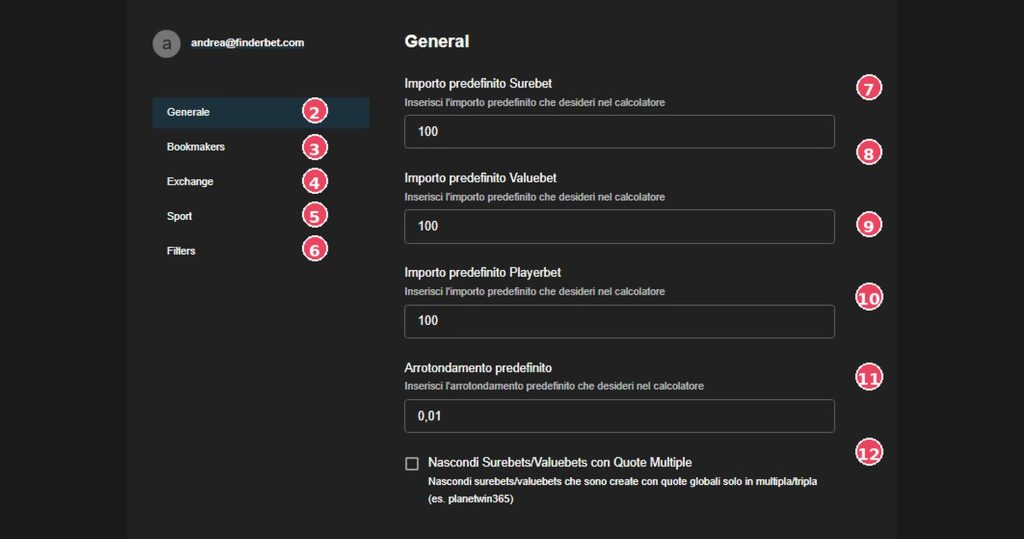
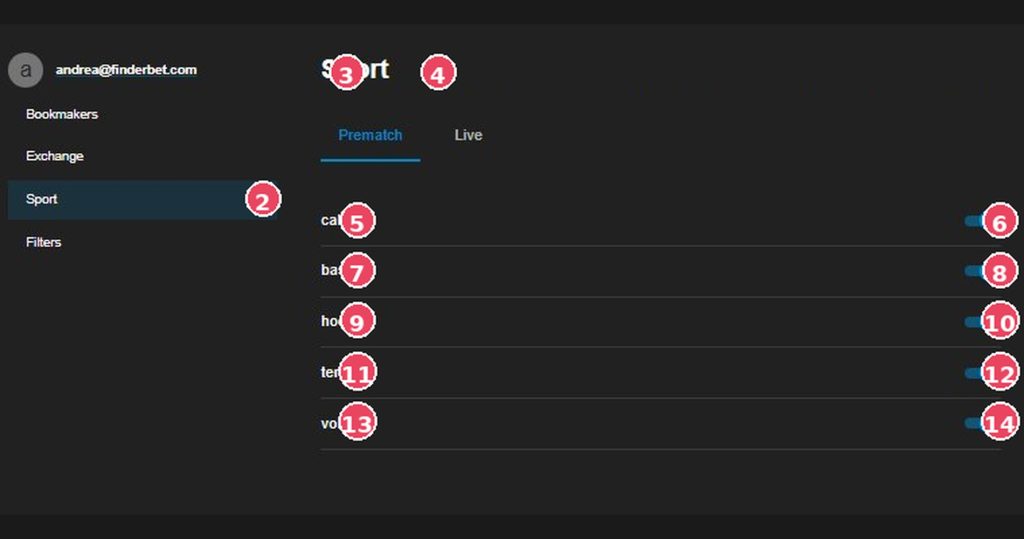
General
2 | General (active menu) | Currently open subsection. |
3 | Bookmakers | Bookmaker management, licensing, and commissions. |
4 | Exchange | Exchange setup with fees. |
5 | Sport | Select sports to monitor. |
6 | Filters | Manage saved custom filters. |
7 | Section title | Indicates the active subsection (“General”). |
8 | Default Surebet Amount | Default value in the surebet calculator. Default: 100. |
9 | Default Valuebet Amount | Default value for the valuebet calculator. |
10 | Default Playerbet amount | Default value for playerbet bets. |
11 | Default rounding | Rounding precision (e.g. 0.01 = to the nearest hundredth). |
12 | Hide Multiple Quotes | Hides surebets generated by multiple/triple odds (e.g. PlanetWin365). |
Bookmakers
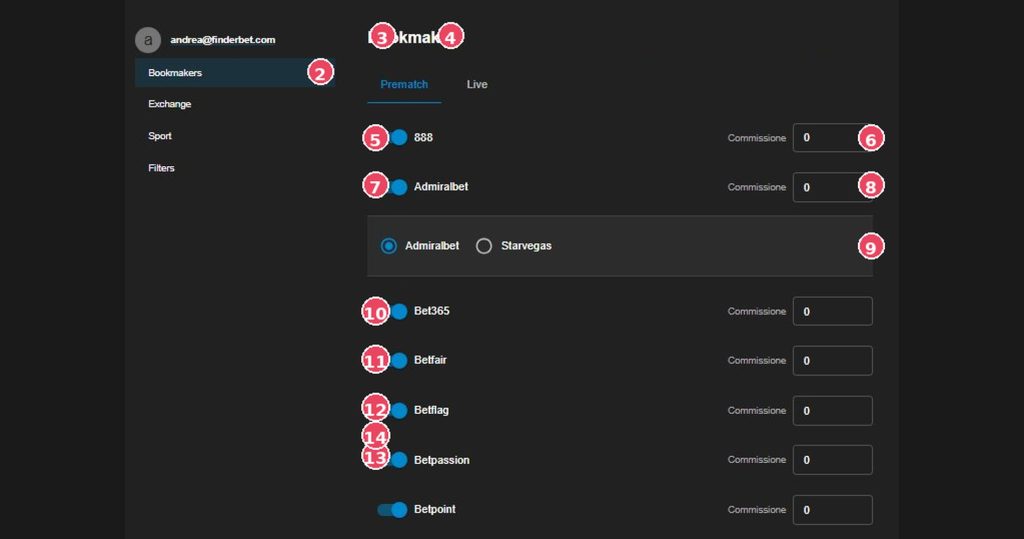
| 2 | Bookmakers (active menu) | Subsection to manage all bookmakers. |
| 3 | Tab Prematch | Bookmaker for pre-match betting. |
| 4 | Tab Live | Bookmaker for in-play trading. |
| 5-14 | Toggle Bookmaker | On/off for each bookmaker. If disabled, their odds will not appear. |
Exchange
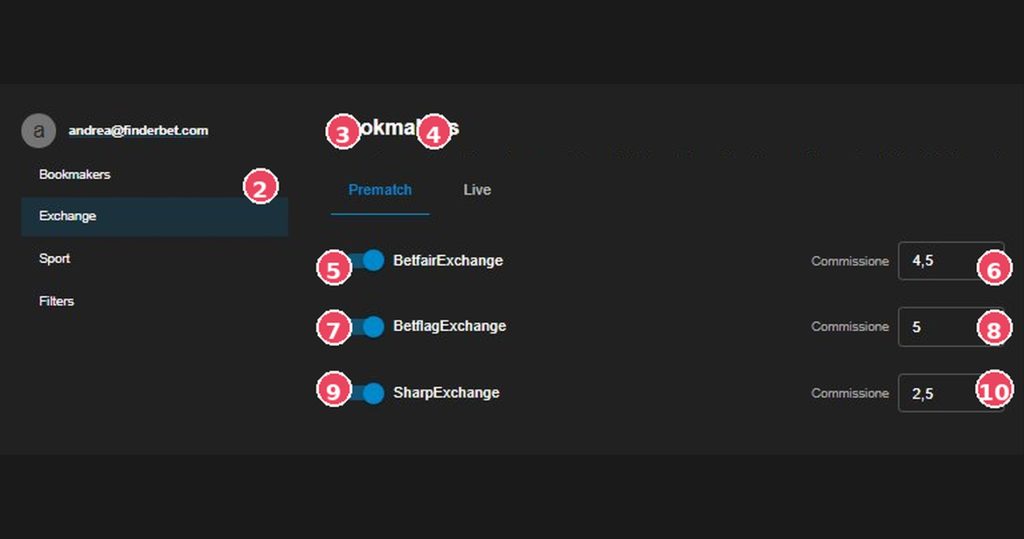
|
2 |
Exchange (active menu) | Exchange subsection. |
|
3 |
Tab Prematch | Exchange for the pre-match market. |
|
4 |
Tab Live | Exchange for the in-play market. |
|
5-7-9 |
Toggle Exchange | Exchange Enablement |
|
6-8-10 |
Exchange Commission | Commissions on winnings. This affects net ROI. |
Sport
|
2 |
Sport | Sports Subsection. |
|
3 |
Tab Prematch | Sports for pre-game events. |
|
4 |
Tab Live | Sports for in-play events. |
|
5-7-9-11-13 |
Label Sport | List of available sports |
|
6-8-10-12-14 |
Switch Sport (ON) | Blue toggle = active. Tap to deactivate. |
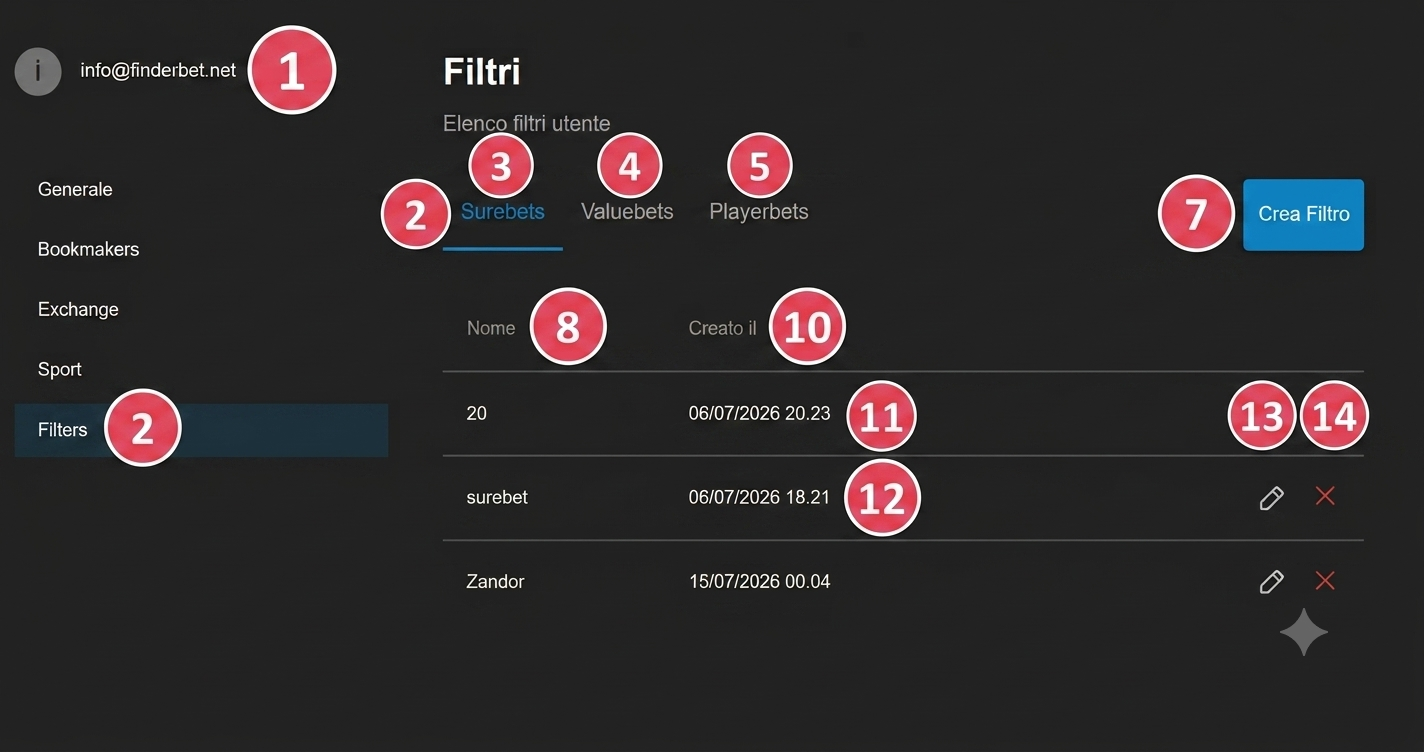
Filters
| 2 | Filters | Subsection for saved custom filters. |
| 3 | Tab Surebet | Filters for the Surebet module. |
| 4 | Tab Valuebets | Filters for the Valuebet module. |
| 5 | Tab Playerbets | Filters for the Playerbet module. |
| 6 | Tab Live | Filters for in-play opportunities. |
| 7 | Create Filter | Opens the form to create a new filter profile. |
| 8 | Column Name | Name assigned to the filter. |
| 9 | Column Created on | Date and time of creation. |
| 10-11-12 | Saved Filters | List of saved filters |
| 13 | Edit icon (pencil) | Opens the saved filter in edit mode. |
| 14 | Delete icon (red X) | Permanently deletes the filter. This operation is irreversible. |
6. Custom Filters
Custom filters allow you to save search configurations and recall them as quick tabs in the main list.
STEP 1 – CREATE Settings › Filters › “Create Filter”. Fill out the form and click “Save Filter”. |
STEP 2 – EDIT Settings › Filters › pencil icon (✎). Edit the fields and press “Save Filter”. |
STEP 3 – APPLY Click the tab with the filter name in the main list. The list updates instantly. |
STEP 4 – DESELECT Click the “All” tab or the red “Reset all” button in the sidebar. |
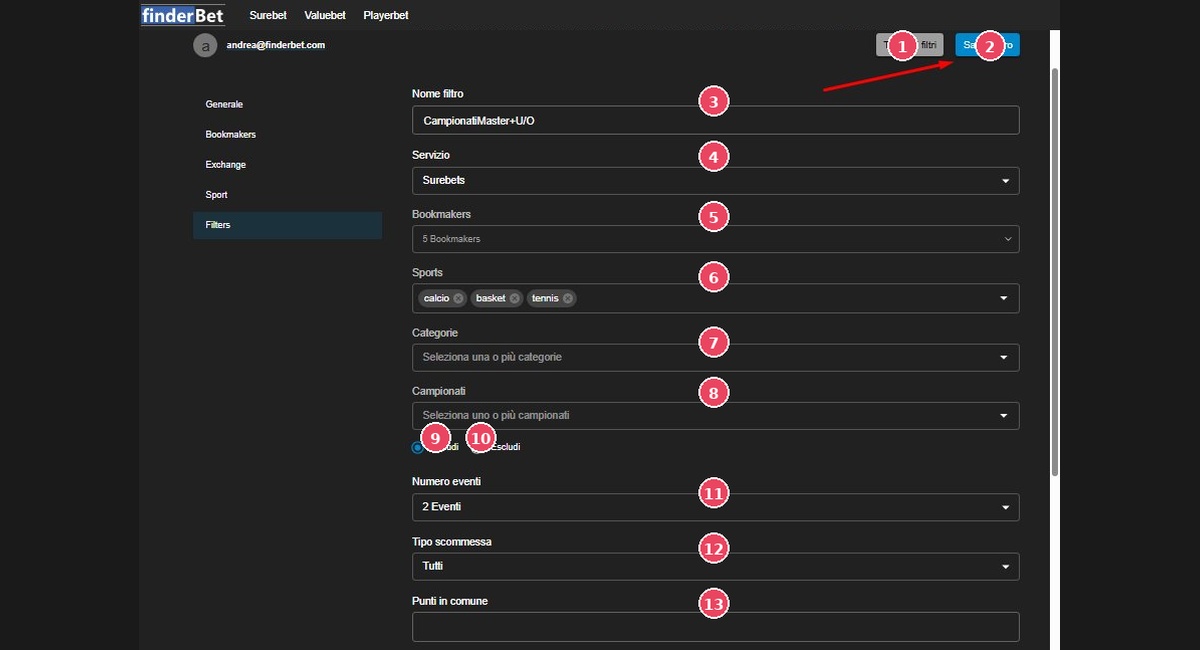
Filter Creation
1 | Back to filters | Exit the form without saving. |
2 | Save Filter | Saves the filter and adds it as a tab in the main list. |
3 | Filter name | Filter identifier name (e.g. “Masters+U/O Championships”). |
4 | Service | Module to filter: Surebets, Valuebets, or Playerbets. |
5 | Bookmakers | Multiple bookmaker selection to include. |
6 | Sports | Sports with removable tags (football, basketball, tennis). |
7 | Categories | Market type (U/O, GG/NG, DC). Blank = all. |
8 | Championships | Specific championship to include or exclude. |
9 | Radio: Include | Show only opportunities in selected leagues. |
10 | Radio: Exclude | Hides opportunities in selected leagues. |
11 | Number of events | Number of legs: 2 events, 3 events or All. |
12 | Bet type | Market Category: All, Over/Under, AH, 1X2, GG/NG. |
13 | Commonalities | For middlebets: minimum width of the shared range. |
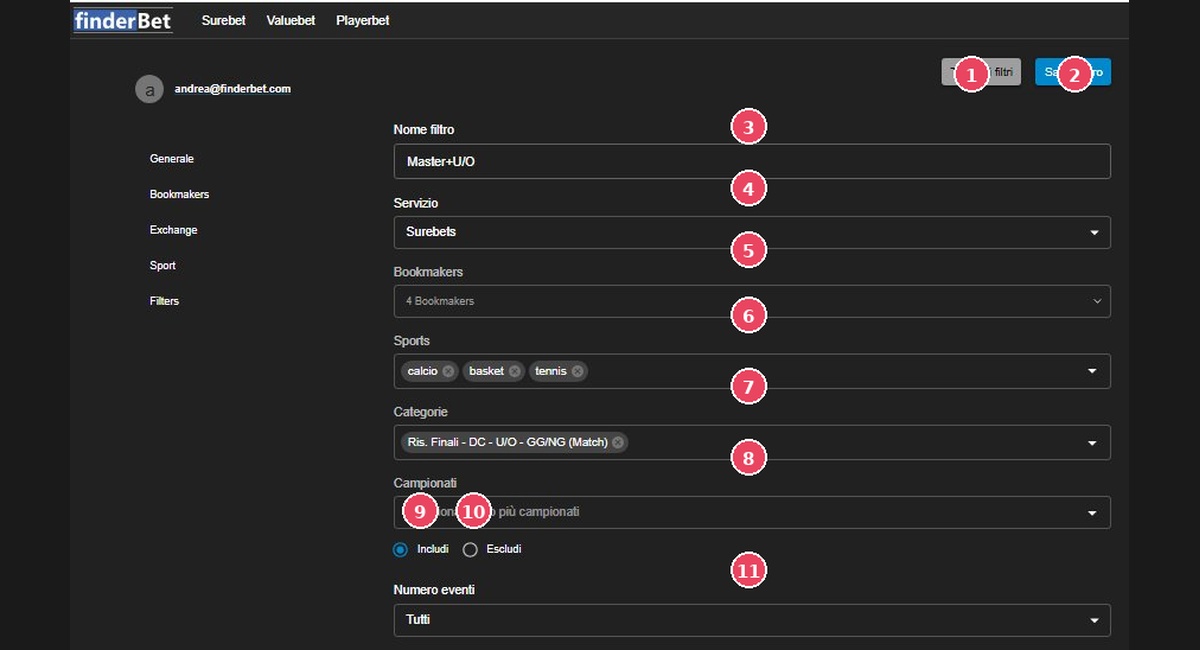
Edit Filter
1 | Back to filters | Cancel the change. |
2 | Save Filter | Confirm and update the filter. |
3 | Name changed | From “ChampionatiMaster+U/O” to “Master+U/O”. |
5 | Bookmakers reduced | From 5 to 4 bookmakers: one removed from the selection. |
7 | Category added | Added: Final Res. – DC – U/O – GG/NG (Match). |
11 | Number of events: All | Changed from “2 Events” to “All”. |
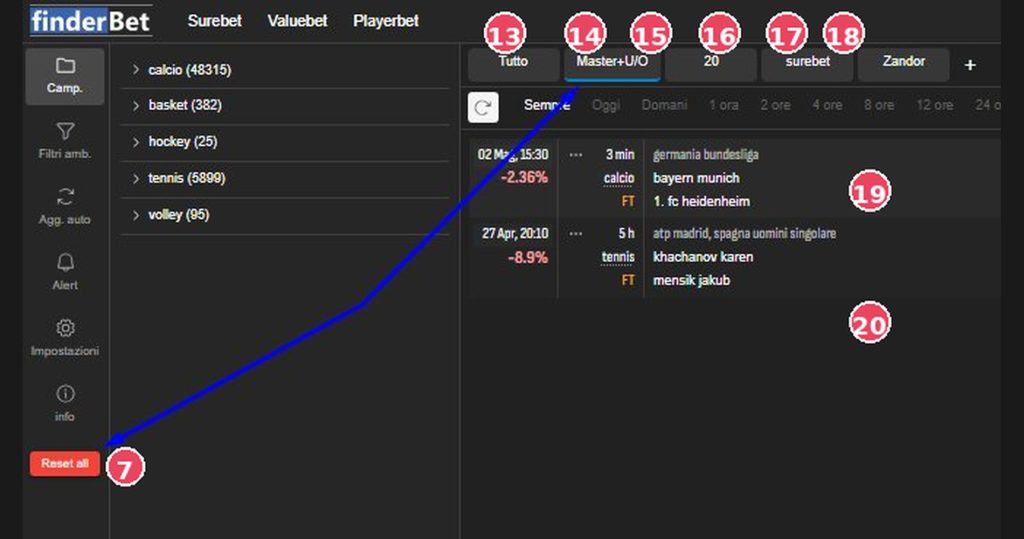
Application and Deselection
| 7 | Reset all (red) | It appears red when at least one filter is active. Clicking it resets everything and returns you to the full view. |
| 13 | Tab All | Deselect any quick filter. First method for deselecting. |
| 14 | Tab Filter (active) | Custom filter active: the list only shows opportunities that meet all the saved criteria. Yes, I can select more than one custom filter. |
| 18 | + Button | Takes you to the form for creating a new filter. |
| 19-20 | Results | Games visible based on the selected filters |
7. Middlebet
The Middlebet view identifies opportunities where two odds overlap in a variable total over/under market. Maximum profit is achieved when the result falls within the range of similar points; outside of this range, a limited loss occurs.
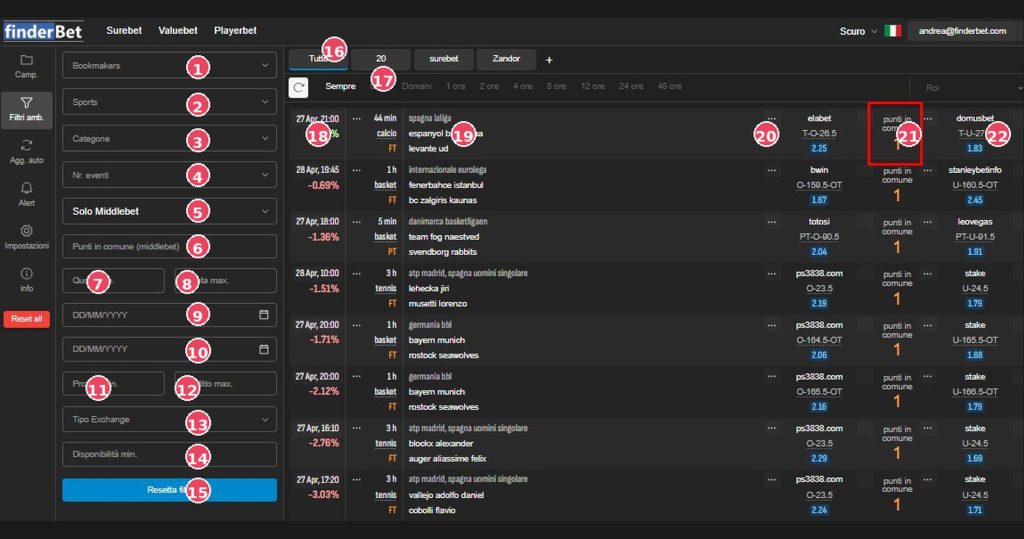
Middlebet specific filters
1 | Bookmakers | Filter for specific bookmakers. |
2 | Sports | Filter for Sports |
3 | Categories | Championship/tournament. |
4 | No. of events | Number of markets involved. |
5 | Only Middlebet | Exclusive filter: Show only opportunities with commonality ranges. |
6 | Commonalities | Minimum width of the shared range. Higher value = wider range = higher probability of maximum profit. |
7 | Minimum odds. | Minimum quota threshold. |
8 | Odds max. | Maximum quota threshold. |
9 | Date from | Start of period (DD/MM/YYYY). |
10 | Date to | End of period. |
11 | Min. Profit | Maximum controlled loss out of range. |
12 | Max profit. | Maximum profit threshold. |
13 | Exchange Type | Exchange involved. |
14 | Minimum availability. | Minimum liquidity on the exchange. |
15 | Reset all (red) | Appears red when filters are active. Resets everything. |
Middlebet List
16 | Quick Filters Tab | Filter profiles also applicable to the middlebet list. |
17 | Time filters | Period: Always, Today, 1h… |
18 | ROI% (negative) | This represents the maximum guaranteed loss outside the range. Profit is only realized within the shared range. |
19 | Event details | League, date/time, sport, teams, status (FT/PT). |
20 | Bookmaker 1 + market | First leg: bookmaker, market type (T-O, O-OT…) and odds. |
21 | Commonalities (column) | Number of points/lines shared between the two markets. Value 1 = one point of overlap. |
22 | Bookmaker 2 + market | Second leg with complementary market and quota. |
8. Playerbet
The Playerbet module identifies opportunities on markets linked to the individual performances of players. The main visual difference is the presence of the player’s name at the top of the event detail, before the championship and teams.
Navigation
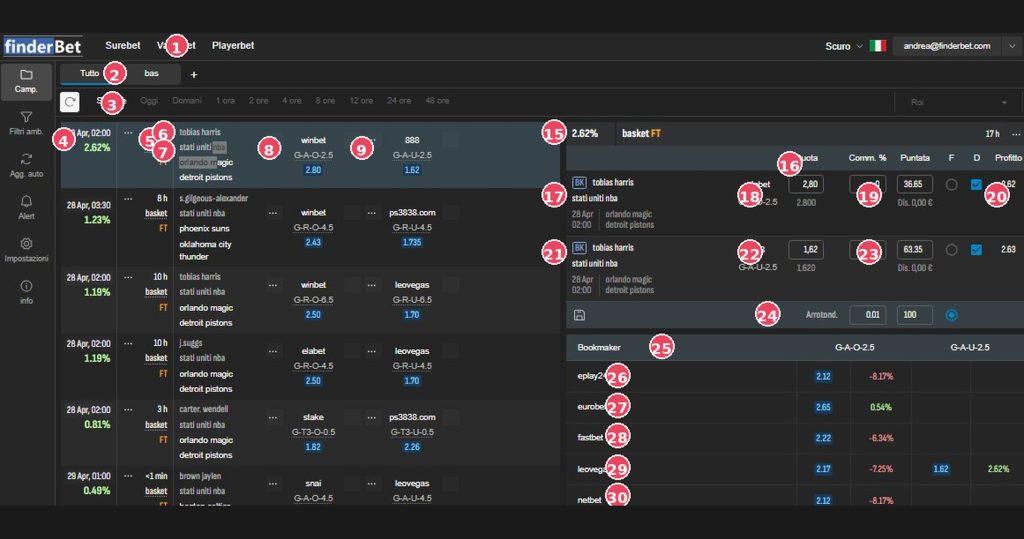
1 | Playerbet (menu) | Active item in the main menu. |
2 | Tab sport | Everything + “bas” (basketball). The + adds other sports. |
3 | Time filters | Period selector. |
Playerbet List – Line Structure
Lorem ipsum dolor sit amet, consectetur adipiscing elit. Ut elit tellus, luctus nec ullamcorper mattis, pulvinar dapibus leo.
4 | ROI% + Date/Time + Time | Guaranteed profit, event date and missing hours. |
5 | Sport + Period | Sport Type and Period FT = Full Time |
6 | Player name — Playerbet exclusive element | The athlete’s name (e.g., Tobias Harris, S. Gilgeous-Alexander, J. Suggs) appears first. Markets refer to this player’s stats. Codes: G-A-O = Goals+Assists Over, G-R-O = Goals+Rebounds Over, G-T3-O = Goals+Triple Over. |
7 | Championship + Teams | Championship and teams on the field. |
8 | Bookmaker 1 + Market | First leg with market type on player statistics. |
9 | Bookmaker 2 + Market | Second leg with complementary player market. |
Playerbet Calculator
15 | Calculator Header | ROI% + sport + status + time. |
16 | Column headers | Odds / Comm.% / Stake / F / D / Profit (additional column to the standard Surebet). |
17 | Row BK1 – Player Name | BK badge, player name, league, bookmaker. |
18 | BK1 Share + Market | Quota (editable) and market type. |
19 | bET BK1 | Optimal amount calculated. |
20 | BK1 Profit | Expected absolute gain on this leg. |
21 | Line BK2 | Second leg with same player and opposite bookmaker. |
22 | BK2 Odd + Market | Opposite market. |
23 | Bet BK2 | BK1 + BK2 = total amount. |
24 | Rounding + Calculate | Precision and recalculation button. |
Oddschecker Playerbet
| 25 | Column header | Quotes for G-A-O-2.5 and G-A-U-2.5 with % variation from the optimal. |
| 26-30 | Bookmakers | List of bookmakers that quote the same market |