



Introduction
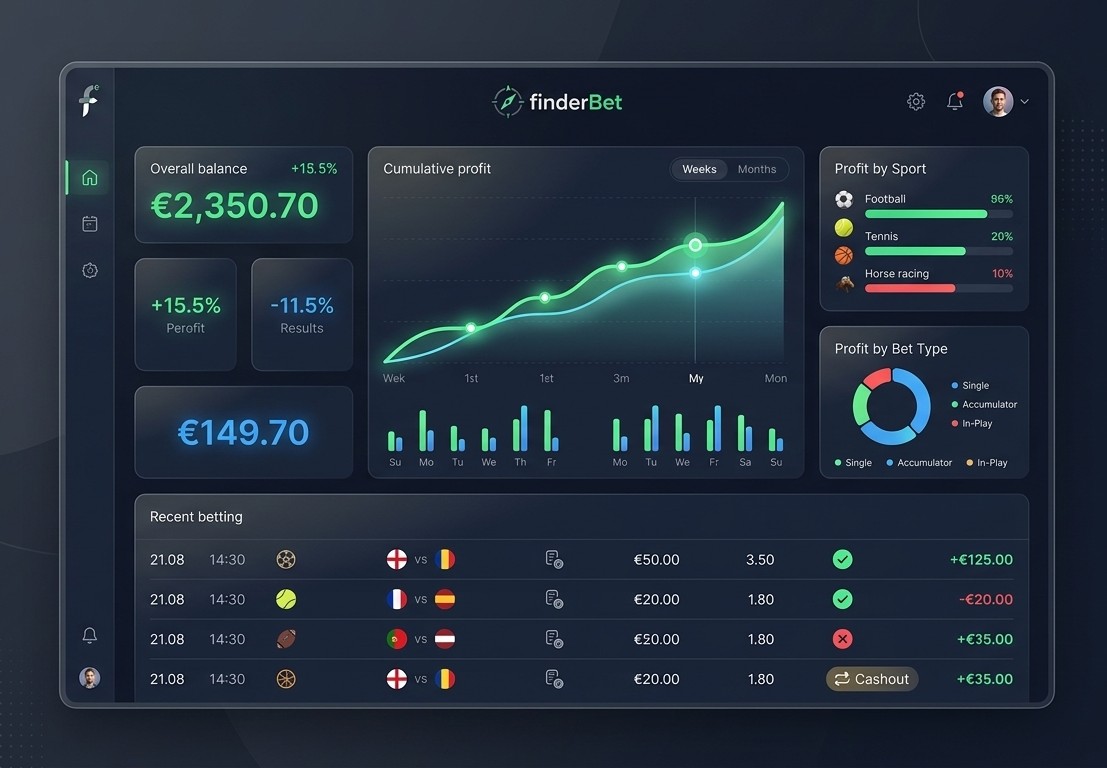
finderBet’s Profit Tracker is a comprehensive and powerful tool for tracking bets across all services: SureBet, ValueBet, and Exchange. It allows you to:
- Store and record your profits
- Have a balance sheet report of the profits generated at the various bookmakers
- Analyze the real perceived return (ROI)
- Create separate reports by book, by period and by type of service
- Manage money scientifically
1. My Profits – My Saved Plays
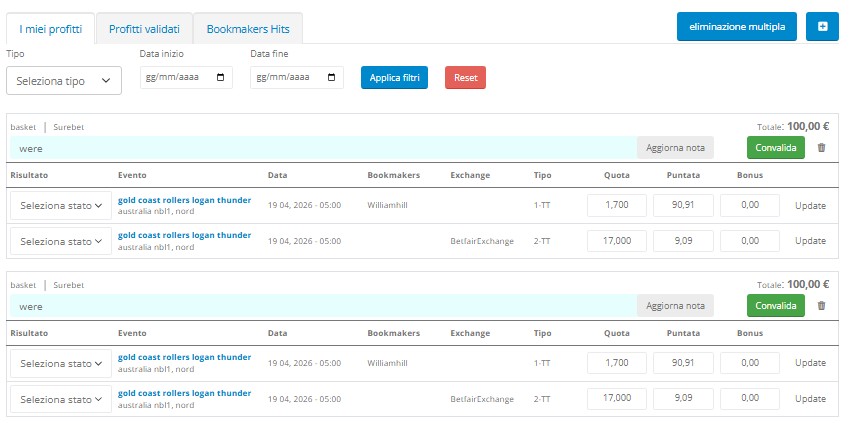
The My Profits tab is the main screen where all recently placed bets are displayed. All values entered into the calculators (amounts, odds) are accurately reported, broken down by sport and service type.
How to save a game
SureBet, ValueBet and Exchange services have different saving methods:
- SureBet / Exchange: The “Save SureBet” button is located in the drawer. Clicking it displays a confirmation window.
- ValueBet: The button is located next to the bet. You will be asked to enter the amount of the bet placed.
Once saved, the play automatically appears in My Profits.
Editing game data
For each saved game, you can edit the following fields before validating:
- Quota – if it has changed during acceptance
- Bet – if a bet had to be repeated in the book
- Bonus – if you have a bonus available to spend on a bet
After changing the values, click the UPDATE button to save the changes.
💡 The NOTE entered during saving can be modified at any time before validation using the “Update note” button. |
Register a Bonus
The registered bonus becomes part of the total bet, but is subtracted for statistical and accounting purposes of the bookmaker’s play, according to the formula:
TOTAL AMOUNT GAME = BOOK AMOUNT + BONUS
In the statistics of the single book, the total is considered as TOTAL BOOK AMOUNT, while the total amount wagered is taken into account for the ROI calculation.
Validating a play
When the event is over and the outcome is certain, you need to:
- Open the “Select Status” drop-down menu next to each book.
- Select: Won, Lost or Refunded (e.g. in case of cancellation).
- Click on the green VALIDATE button.
The system automatically sets LOST if you selected WON first, making surebet entry easier.

💡 To permanently delete a play from the Profit Tracker, use the trash can button (🗑) next to the row. |
Filters and search
Bets can be filtered for a quicker search of events to validate:
- Type of service (surebet, valuebet, exchange)
- Event start date
- Event end date
- Combination of one or more parameters
2. Validated Profits – Event History
The Validated Profits tab contains a history of all previously played and validated events. For each event, a summary line with the bet information is displayed.

Details of the validated game
By opening the arrow to the left of each row you can see the complete details of the game: bookmaker, exchange, type, odds, stake, bonus and result.
The PROFIT field represents the sum of the bookmakers’ bets expressed in currency (the net profit generated by the game).
Invalidate a play
If you’ve incorrectly validated an event, or want to make changes to the amounts, you can revert to the original situation by clicking INVALIDATE. The bet will be available again in the My Profits screen for editing and revalidation.
💡 Even in Validated Profits, you can permanently delete a bet with the trash can button. This action is irreversible. |
3. Bookmakers Hits – Bookmaker Balance Sheet
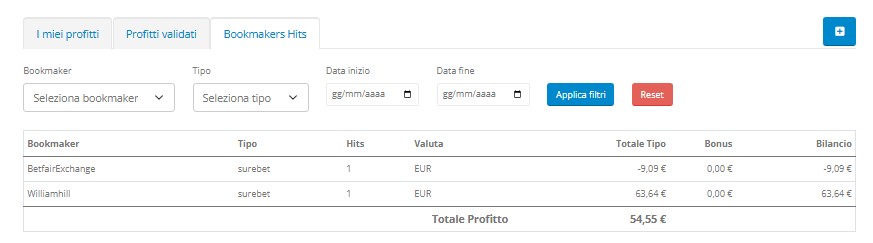
The Bookmakers Hits tab is the most important tool for money management: it allows you to easily monitor the progress of the balance of individual bookmakers and manage your gaming budget.
Report columns
Each row of the Bookmakers Hits table shows:
- Bookmaker – a bookmaker can appear multiple times for different types of service
- Type – type of service used (surebet, valuebet, exchange)
- Hits – number of times the book was used for that service
- Currency – reference currency
- Total Type – total amount played for the single service
- Bonus – Bonuses registered before validation
- Balance – total amount wagered considering all services
How to read the balance sheet
The balance sheet is the key data for understanding how funds are distributed across the various books. For example:
valuebet +€94 + surebet -€140 = balance -€46
In the example screenshots uploaded, the surebet on Gold Coast Rollers vs Logan Thunder generated:
- Williamhill (surebet): +€63.64 (bet won)
- Betfair Exchange (surebet): -€9.09 (lay lost)
- Total Profit: €54.55
Filters for custom reports
For each report you can filter by:
- Specific bookmaker
- Type of service
- Period (Start Date / End Date)
The TOTAL PROFIT is automatically recalculated with each filter application. Use APPLY FILTERS to confirm your selection and RESET to return to the full view.
💡 Use the monthly filters to monitor your performance and check which bookies are performing best, so you can optimize your gaming budget. |
4. The Real Income – ROI Table
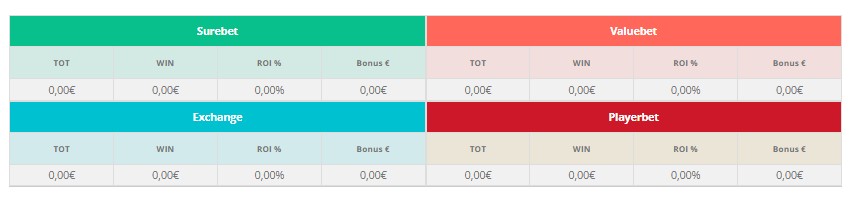
All recorded data is summarized in a single summary table visible at the top of the Profit Tracker, which indicates the relationship between the total invested and the actual income received.
Metrics for each service
For each service (Surebet, Valuebet, Exchange, Playerbet) the following are calculated:
Field | Description |
% | Average percentage reported in finderBet services |
TOT | Total amounts wagered for all bookies |
WIN | Total perceived as real earnings |
ROI % | % ratio between total wagered and actual perceived earnings |
Bonus € | Total bonuses registered |
IMPORTANT NOTE: The percentage (%) indicated in the service may differ from the ROI %, as odds adjustments, rounding of amounts, and betting imbalances may be applied. The ROI % represents the actual income you are receiving.
5. Manually Entering a Play
The Profit Tracker allows you to manually enter a bet in the following cases:
- You found a play manually without using calculators
- You forgot to save a game and it no longer appears in the calculators
- You want to record a second play similar but not identical to the one proposed
- Any other personal needs
How to enter a manual play
Access the Profit Tracker and click on the + button at the top right. The Manual Entry screen will appear with the following fields:
- Type of bet (Surebet / Valuebet / Exchange)
- Number of events (drop-down menu)
- Event name (required)
- Event date
- Sport
- Optional note
- For each bookmaker: Bookmaker, Type, Commission, Market, Odds, Stake
Required fields are indicated by a corresponding icon. When finished, click ACCEPT to save or CANCEL to cancel.
💡 You can also use manual entry to record bets on bookies not present in the finderBet calculators. |
6. Multi Eliminate Plays
To delete multiple games at the same time without having to delete them one by one, the Multi Delete function is available. This feature is available in both the My Profits tab and the Validated Profits tab.
How to use Multi Delete
- Click the “multiple delete” button at the top right.
- Set the Start Date and End Date for the period to be deleted.
- Click DELETE to confirm (the button only appears after you have set the dates).
⚠ ATTENTION The deletion operation is permanent and the plays CANNOT be recovered. |
7. Match Statistics for Validation
The Profit Tracker integrates direct links to statistics programs that collect event information, facilitating the validation of bets.
Clicking on the event name in the My Profits list will open an external page with complete match statistics (score, result, sets/quarterfinals, etc.). This information is available for any sport and any match calculated by finderBet services.
💡 Use linked statistics to quickly check the result before confirming the bet, without having to search for information on external sites. |
Feature Summary
Functionality | Description |
My Profits | View and manage saved games awaiting validation |
Match Statistics | Complete history of all validated events |
Bookmakers Hits | Balance sheet for each bookmaker with filters by period and service |
ROI table | Real income perceived broken down by Surebet, Valuebet, Exchange, Playerbet |
Manual Entry | Adds unsaved plays from calculators |
Multi Delete | Delete multiple plays in a date range in one action |
Match Statistics | Direct link to the event result for easy validation |